<img height="1" width="1" style="display:none" src="https://www.facebook.com/tr?id=139163818022217&amp;ev=PageView&amp;noscript=1"> <img height="1" width="1" style="display:none" src="https://www.facebook.com/tr?id=271598307802760&amp;ev=PageView&amp;noscript=1">

Boxの新しいマークダウンレプリゼンテーションによるAIアプリケーションの強化

 公開日:2025.10.21  更新日:2026.06.10

開発者がAI搭載のアプリケーションの作成を進めるにつれて、構造と意味を維持しながら大規模言語モデル (LLM) にドキュメントを供給する方法という1つの課題が決まって浮上します。今回は、まさにこの問題を解決するBoxの新しいマークダウンレプリゼンテーション機能を紹介します。

AIアプリケーションにとってマークダウンが重要な理由

PDFまたはドキュメントからテキストを抽出する際、通常は、すべての書式設定、ヘッダー、表、構造情報が失われた単なるテキスト文字列が取得されます。そのため、LLMがドキュメントの構成やコンテキストを理解することは難しくなります。

マークダウンレプリゼンテーションは、この重要な構造を保持します。

  • ヘッダーは階層構造を維持します (# Title、## Section、### Subsection)
  • は列形式を維持します
  • リストは構成を維持します
  • 強調と書式設定の指示は保持されます

この構造化された形式により、LLMは、ドキュメントのコンテキストをより深く理解できるようになり、より正確な分析、要約、Q&Aの応答につながります。

Boxのマークダウンレプリゼンテーションの仕組み

Boxのレプリゼンテーションとは、Boxアカウントに保存されているファイルの代替アセットです。Boxでは、常にPDF、サムネイル、テキスト抽出をサポートしてきましたが、新しいマークダウンレプリゼンテーションにより、ドキュメント処理がさらに一歩進みます。

はじめに

まず、ファイルに利用可能なレプリゼンテーションをリクエストします。この例では、マークダウンの利用可否を確認しています。

curl --location 'https://api.box.com/2.0/files/1993799099215?fields=id%2Cname%2Crepresentations' \
--header 'x-rep-hints: [markdown]' \
--header 'Authorization: ??????'

これにより、リクエストされたレプリゼンテーションに関する情報が返されます。

{
    "type": "file",
    "id": "1993799099215",
    "etag": "1",
    "name": "test.docx",
    "representations": {
        "entries": [
            {
                "representation": "markdown",
                "properties": {},
                "info": {
                    "url": "https://api.box.com/2.0/internal_files/1993799099215/versions/2200612360399/representations/markdown"
                },
                "status": {
                    "state": "none"
                },
                "content": {
                    "url_template": "https://dl.boxcloud.com/api/2.0/internal_files/1993799099215/versions/2200612360399/representations/markdown/content/{+asset_path}"
                }
            }
        ]
    }
}

マークダウン生成のトリガー

ステータスが"state": "none"と表示されている場合、マークダウンレプリゼンテーションはまだ生成されていません。それをinfo URLを使用してリクエストします。

curl --location 'https://api.box.com/2.0/internal_files/1993799099215/versions/2200612360399/representations/markdown' \
--header 'Authorization: ••••••'

最初は、statuspendingと表示されます。

{
    "representation": "markdown",
    "properties": {},
    "info": {
        "url": "https://api.box.com/2.0/internal_files/1993799099215/versions/2200612360399/representations/markdown"
    },
    "status": {
        "state": "pending"
    },
    "content": {
        "url_template": "https://dl.boxcloud.com/api/2.0/internal_files/1993799099215/versions/2200612360399/representations/markdown/content/{+asset_path}"
    }
}

マークダウンのダウンロード

処理が完了したら (ステータスが"success"に変わったら)、マークダウンコンテンツをダウンロードします。

curl --location 'https://dl.boxcloud.com/api/2.0/internal_files/1993799099215/versions/2200612360399/representations/markdown/content/' \
--header 'Authorization: ••••••'

以下に例を示します。

AutoGen: Enabling Next-Gen LLM Applications via Multi-Agent Conversation

Qingyun Wu , Gagan Bansal , Jieyu Zhang, Yiran Wu, Beibin Li, Erkang ...

# Abstract

AutoGen is an open-source framework that allows developers to build LLM ...

## Introduction

Large language models (LLMs) are becoming a crucial building block in ...

## Scope

In light of the intuition and early evidence of promise, it is ...

Our insight is to use multi-agent conversations to achieve it. There...

Here is a random UUID in the middle of the paragraph! 314b0a30-5b04- ...

* How can we design individual agents that are capable, reusable, ... 
* How can we develop a straightforward, unified interface that can ...

In practice, applications of varying complexities may need distinct ...

Here is a random table for .docx parsing test purposes:

|  |  |  |  |  |  |
| --- | --- | --- | --- | --- | --- |
| 1 | 2 | 3 | 4 | 5 | 6 |
| 7 | 8 | 9 | 10 | 11 | 12 |
| 13 | 14 | ABC | 15 | 16 | 17 |
| 18 | 19 | 20 | 21 | 22 | 23 |
| 24 | 25 | 26 | 27 | 28 | 29 |

Box MCPサーバーで今すぐお試しください

Boxの公式SDKにマークダウンレプリゼンテーションを追加する作業を進めていますが、Box MCP (Model Context Protocol) サーバーで今すぐこの機能を試すことができます。このコミュニティ版のツールは、Claudeや他のAIアシスタントと直接統合されるため、テストやプロトタイプ作成に最適です。

Claudeの例: テストドキュメントの分析

Boxアカウントにアップロードしたサンプルドキュメントを次に示します。
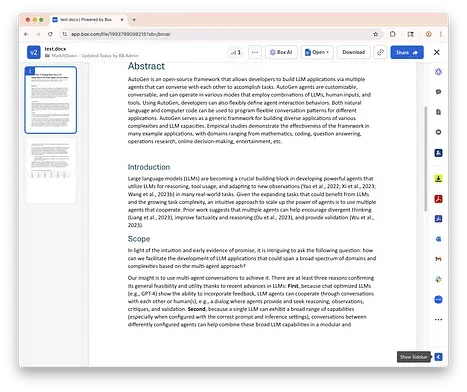
0_9kB2YBNq9MEmcwBe

サンプルのMS Wordドキュメント

Claudeに対してこのファイルを読み取るよう依頼し、その書式設定について質問します。
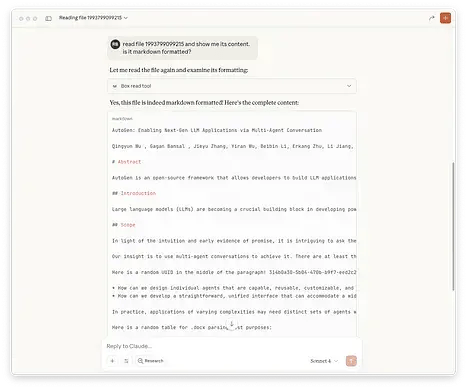
0_vrfAal6mn4ARjK3g

Claudeでファイルがマークダウン形式であることを確認

次に、ファイルを表示するよう依頼します。
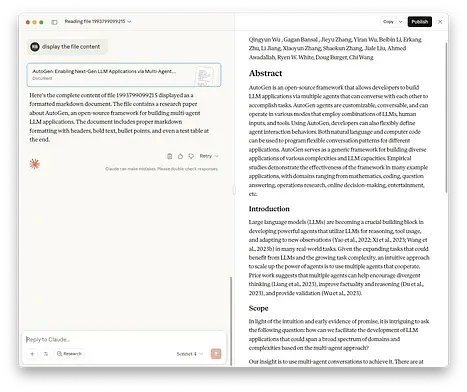
0_d_68TnOjB0Jce-A0

Claudeでマークダウン形式を使用してファイルを表示

Box MCPサーバーをマークダウンレプリゼンテーションとともに使用すると、以下のことがわかります。

  • 保持されるドキュメント構造: ヘッダー、セクション、書式設定は元の状態で保たれます
  • AI分析の改善: Claudeはドキュメントの階層を理解し、より正確な要約を提供できます
  • 対話的探究: 特定のセクションについて質問すると、AIはドキュメントの正確な部分を参照できます
  • 構造化された出力: 元のドキュメント構成に配慮したレポートの生成、データの抽出、要約の作成を実行します

Box MCPサーバーのコミュニティ版に存在するファイル読み取りツールは、常にファイルのマークダウンレプリゼンテーションを取得しようとし、エラーが発生した場合や利用できない場合にテキストにフォールバックします。すべてのファイルをマークダウンやテキストに変換できるわけではありません。

サポートされているファイルの種類

マークダウンレプリゼンテーションは、さまざまなドキュメント形式で機能します。

  • Microsoft Office: Word (.docx)、PowerPoint (.pptx)、Excel (.xls、.xlsx、.xlsm)
  • Google Workspace: Googleドキュメント (.gdoc)、Googleスライド (.gslide.gslides)、Googleスプレッドシート (.gsheet)
  • PDFファイル (.pdf)

パフォーマンスに関する考慮事項

  • 生成時間: マークダウンの変換は、ファイルのサイズやコンテンツに左右され、3ページのMicrosoft Wordドキュメントの場合は200ミリ秒かかることを確認しました。ユースケースに応じて、適切なポーリングメカニズムが推奨されます。
  • キャッシュ: 生成されたレプリゼンテーションは、後続のリクエストのためにBoxによってキャッシュされます。

今すぐ始めましょう

SDKはまだ更新されていませんが、レプリゼンテーションはパラメータに基づいているため、今すぐ使用を開始できます。以下に例を示します。

class RepresentationType(Enum):
    MARKDOWN = "markdown"
    EXTRACTED_TEXT = "extracted_text"

def box_file_text_extract(client: BoxClient, file_id: str) -> Dict[str, Any]:
    """
    Extracts text from a file in Box. The result can be markdown or plain text.
    If a markdown representation is available, it will be preferred.
    Args:
        client (BoxClient): An authenticated Box client.
        file_id (str): The ID of the file to extract text from.
    Returns:
        Dict[str, Any]: The extracted text.
    """
    # First we check if file representation markdown is available
    representation = _process_file_representation(
        client, RepresentationType.MARKDOWN, file_id
    )
    if (
        representation.get("status") != FileRepresentationStatus.IMPOSSIBLE.value
        and representation.get("status") != FileRepresentationStatus.ERROR.value
        and representation.get("status") != FileRepresentationStatus.UNKNOWN.value
    ):
        return representation
    representation = _process_file_representation(
        client, RepresentationType.EXTRACTED_TEXT, file_id
    )
    return representation

コミュニティのGitHubリポジトリで、ファイル読み取りツールの実装の詳細を確認できます。

今後の予定

Boxのマークダウンレプリゼンテーションは、すべてのBox APIユーザーが利用できるようになりました。

質問がある場合やマークダウンレプリゼンテーションの使用方法を共有したい場合は、Developer Community (英語のみ) でディスカッションに参加するか、実装の詳細についてAPIドキュメントを参照してください。

よりスマートなAIアプリケーションを作成する準備ができたら、今すぐBoxのマークダウンレプリゼンテーションを試して、構造化されたドキュメントコンテンツによってLLMの統合をどのように変革できるかをご確認ください。


RECENT POST「開発者」の最新記事


開発者

Box、MCPアプリのサポート対象をChatGPT、Microsoft 365 Copilot、Gleanに拡大

開発者

AIエージェントにコンテンツの活用方法を教える: OpenAI Codex向けBox Skillの構築

開発者

Box AIとOpenAI Agents SDKで自律的なドキュメントワークフローを実行

開発者

Box CLI: 開発者とAIエージェントのためのコンテンツCLI